Quick answer: Choose ChatGPT if you need to draft and revise content, analyze files, or work on code. Choose Perplexity if you want current information and can quickly trace an answer back to its sources.
For my own work, I use ChatGPT to group keywords and think through search intent. I reach for Perplexity when I need sources I can open and check.
A while ago, I wrote on LinkedIn about how to get cited in ChatGPT and Perplexity. A friend who runs a web development business asked me why he should care about showing up in both. “Do ChatGPT and Perplexity do the same job?”
Both can search the web and cite sources. But a citation in one tells you where your site appeared for that question on that platform. If you want to know whether both tools surface your site when a potential client asks a question, check each one.
I reach for Perplexity when I want to find sources. I use ChatGPT when I need to work through what I found and turn it into something I can use. To see where that distinction holds up, I compared their research, writing, coding, and pricing, and gave both tools the same source-based question.
ChatGPT vs Perplexity at a glance
| Factor | ChatGPT | Perplexity |
|---|---|---|
| Models | OpenAI models, with access varying by plan | Multiple providers, with selection and premium models gated by plan |
| Web search | Current web answers with source links | Search-centered answers with inline citations |
| Deep research | Research plans, source controls, and cited reports | Deep Research, including research-to-deliverable work in Computer |
| Writing | My preference for drafting, revision, and continuing a project | My preference when writing starts with finding evidence |
| Coding | Codex provides a dedicated coding environment | Computer can research, code, and build apps |
| Multimodal | File and image work, image creation, and voice | File analysis, image generation, voice, and browser assistance |
| Agents | ChatGPT Work and Codex | Perplexity Computer |
| Browsers and platforms | Web and supported apps. Atlas has retired | Web and apps, plus Comet on Mac, Windows, iOS, and Android |
| Individual pricing | Free, Go, Plus, and three Pro tiers | Free, Pro, and Max |
These are product differences and editorial preferences. Feature limits, model access, and regional availability can change. I explain the relevant restrictions below rather than treating a checkmark as a promise of equal access on every plan.
How did I assess ChatGPT and Perplexity?
I compared ChatGPT and Perplexity through their documented capabilities, plan conditions, and suitability for everyday assignments. I examined how each product finds information, supports revision, handles files, and carries work into agents. I treated pricing and privacy as part of that decision, while excluding untested performance claims from the verdict.
I organized the assessment around three stages of work. First, can I find trustworthy material? Next, can I reason through it and make something useful? Finally, can I deliver that work through the tools and devices the task requires?
That framework matters because the comparison changes with the finish line. A researcher may be satisfied with a clear answer and five useful sources. An editor still needs a defensible argument. A developer needs code that runs. I wouldn’t give all three people the same buying advice.
I used official sources to establish availability and restrictions, favoring specific help articles over broad marketing claims when they conflicted. I did not assign accuracy percentages, response-time scores, or invented test wins. The shared-prompt section later in this article explains how to compare outputs for your own work.
My first-person recommendations are judgments about fit. They aren’t claims that I paid for every plan or used it daily for a month. That distinction lets me be direct about what I recommend without pretending that documentation proves reliability.
What is the difference between ChatGPT and Perplexity?
ChatGPT is a general-purpose AI assistant for conversation, content creation, analysis, and work, while Perplexity starts from finding and explaining information with sources. Their capabilities overlap.
ChatGPT searches the web, and Perplexity can create files and execute tasks, so the distinction describes their primary emphasis rather than a strict boundary.
Perplexity’s current product overview includes research, analysis, building, and automation. ChatGPT’s search documentation confirms current web answers with sources, including on Free. Calling one a search engine and the other an offline chatbot would miss what they offer now.
My distinction is about where I want the work to begin and how far it needs to go. I value source discovery when I’m exploring an unfamiliar subject. I value continuity when I already have material and need several rounds of decisions and revision.
Which models can you use in ChatGPT and Perplexity?
ChatGPT offers OpenAI models, while Perplexity combines models from OpenAI, Anthropic, Google, and other providers. Availability depends on your plan and where you’re working. ChatGPT’s regular conversations, Work, and Codex have different model options. Perplexity’s Search catalog also differs from Computer, so a model name alone doesn’t establish equivalent access.
Models available in ChatGPT
| Model | Where you can use it | Access notes |
|---|---|---|
| GPT-5.6 Luna | Everyday Chat and Think | Free and Go default during the documented rollout |
| GPT-6 Sol | Chat under the GPT-6 option | Rolling out to eligible Plus, Pro, Business, and Enterprise accounts |
| GPT-6 Astra | Chat as GPT-6 Pro, plus Work and Codex | Eligible Pro and managed plans in Chat. Plus includes Astra in Work and Codex |
| GPT-6.1 Sol | Work and Codex | Eligible paid plans, subject to availability and workspace permissions |
| GPT-6.1 Terra | Work and Codex | Available through the relevant model selector, subject to plan access |
| GPT-6 Luna | Work and Codex | Availability varies by plan and client |
OpenAI documents Chat access separately from its Work and Codex model options. Check the selector in the experience you intend to use. OpenAI Help Center
Models available in Perplexity Search
| Model | Provider | Pro | Max |
|---|---|---|---|
| GPT-6.1 Sol | OpenAI | Yes | Yes |
| GPT-6 Astra | OpenAI | No | Yes |
| Gemini 4 Carbon | No | Yes | |
| Gemini 3.8 Flash | Yes | Yes | |
| Claude Sonnet 5.5 | Anthropic | Yes | Yes |
| Claude Opus 5.5 | Anthropic | No | Yes |
| Claude Fable 5.2 | Anthropic | No | Yes |
| Kimi K3 | Moonshot AI | Yes | Yes |
| GLM 5.3 | Z.ai | Yes | Yes |
| Grok 4.7 | xAI | Yes | Yes |
| Nemotron 3.5 Super VL | NVIDIA | Yes | Yes |
This is Perplexity’s November 11, 2026 Search catalog. Free users can use automatic selection through Best but cannot manually choose an advanced Search model. Rollouts and account restrictions can change the options shown.
I see Perplexity’s wider selection as useful when I want another model’s approach without buying several subscriptions. I would still choose ChatGPT when Work, Codex, or an existing project is central to the assignment. Access to an OpenAI model inside Perplexity doesn’t include the complete ChatGPT experience.
Which is better for web search and citations?
Perplexity is a better choice for source-led web discovery because search and citations sit at the center of its offering. ChatGPT is also a credible option for current web questions. Neither product’s source links establish that every sentence is correct, so I judge the connection between the claim and the cited page before trusting either answer.
ChatGPT’s web search guide says search is available across Free, Go, Plus, Pro, Business, Enterprise, and Edu, subject to limits. Perplexity’s pricing page describes inline citations and paid access to additional research sources. The useful comparison is the quality of the evidence each finds for your question.
I gave ChatGPT and Perplexity the same prompt about US ChatGPT Pro pricing as of November 1, 2026. I asked both to use official OpenAI sources, explain the differences between tiers, and flag conflicting information. I wanted to see how clearly each connected its answer to the evidence.
PROMPT: As of November 1, 2026, what does a US customer pay for ChatGPT Pro, and what does each available Pro tier include? Search the web and use official OpenAI sources only.
Give me:
- Each tier’s name and monthly price in USD.
- The main differences in model access, usage allowances, and features.
- Any rollout restrictions or eligibility conditions.
- Whether annual billing is available.
Link each material claim to the specific page supporting it. If official sources conflict, identify the disagreement and explain which source you relied on. Distinguish current terms from older announcements. Mark anything you cannot verify. Keep the answer under 400 words.
ChatGPT
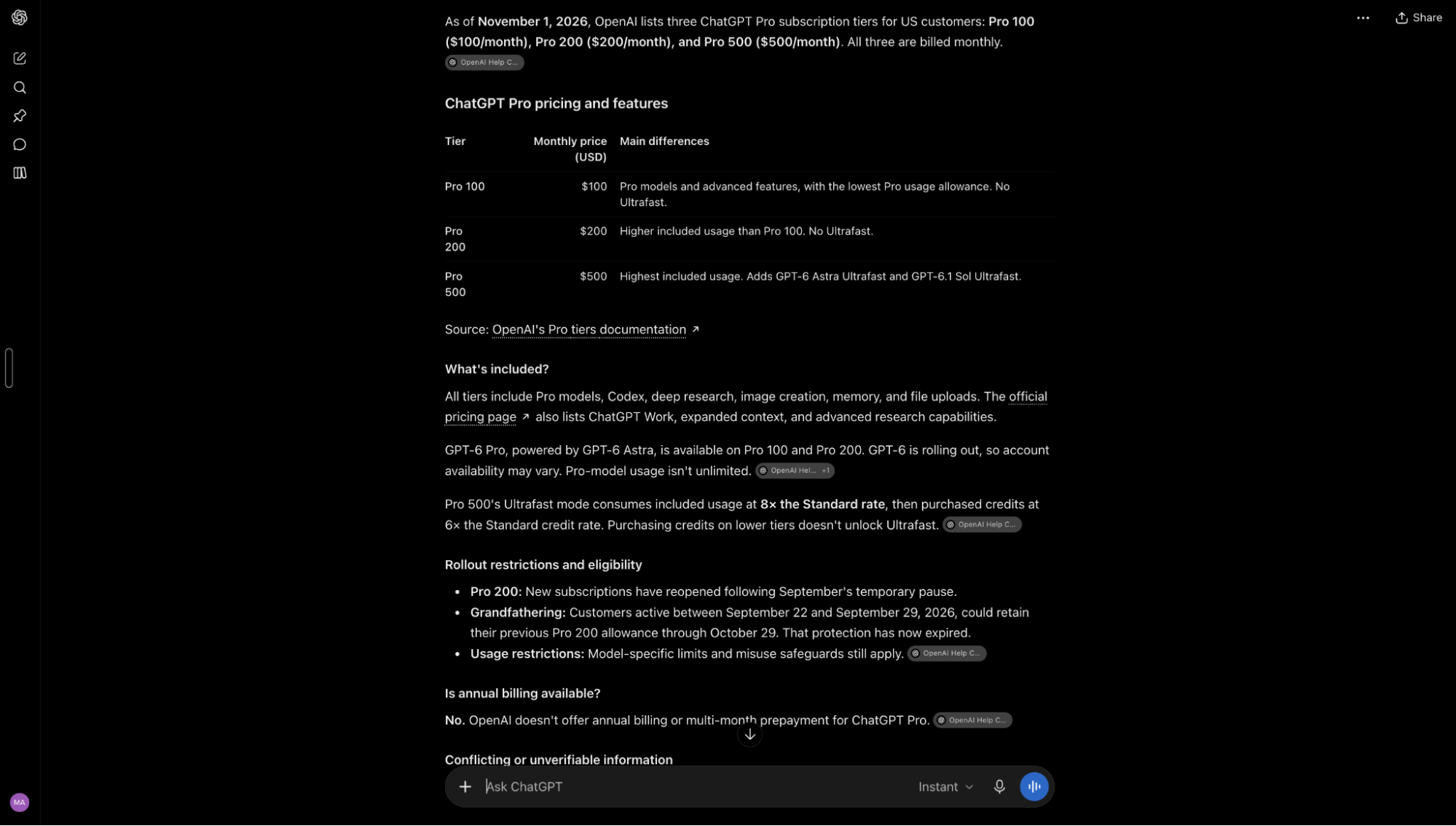
ChatGPT opened with the three Pro tiers and organized their prices and usage differences into a compact table. It then separated included features, rollout restrictions, and annual billing into short sections. I found the layout easy to scan, with source links beside several claims. Its discussion of grandfathered allowances still needed a closer source check before I could rely on it.
Perplexity
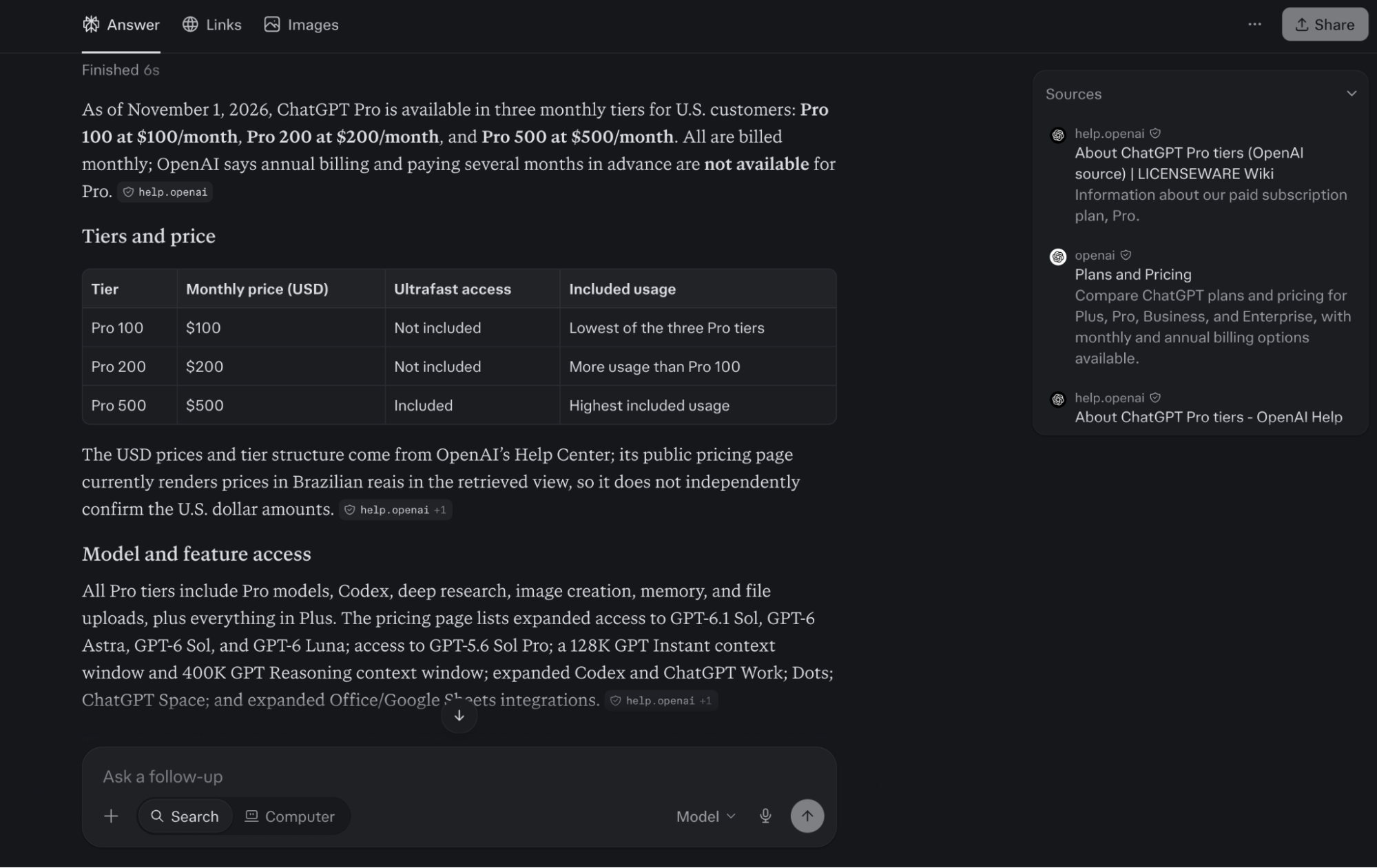
Perplexity also identified the three tiers, but its table separated Ultrafast access from included usage. What stood out to me was its explanation of a source limitation. It said the retrieved pricing page displayed Brazilian reais, so it relied on OpenAI’s Help Center for the US dollar amounts. The visible source panel also made its references easy to locate.
For this prompt, Perplexity explained its source choice more clearly, while ChatGPT presented a compact breakdown. Both cited official sources, but I wouldn’t treat agreement on the prices as proof that every feature or eligibility claim was current.
Which is better for deep research?
ChatGPT offers a reviewable research plan and source controls, whereas Perplexity combines its search foundation with Deep Research and Computer. I favor the option that gives the assignment suitable evidence, useful oversight, and an output I can inspect and reuse.
How their deep research features differ:
- OpenAI’s deep research guide describes a proposed plan that you can edit before work begins. You can follow progress and interrupt to adjust the focus. The output includes citations or source links. Access to connected research sources also depends on permissions, plan, and workspace configuration.
- Perplexity’s Deep Research page describes research inside Computer that can lead into reports, decks, spreadsheets, and dashboards. I see that as a meaningful expansion beyond a cited answer. It means the research product deserves comparison with a work environment, not only with ordinary chat.
I lean toward ChatGPT when shaping the research question and refining the deliverable are central. I lean toward Perplexity when the assignment begins with broad evidence gathering. Those are fit recommendations. Comparable output audits would be needed to claim that one consistently produces more accurate research.
Which is better for writing and revision, ChatGPT or Perplexity?
ChatGPT is better suited to drafting and revision, while Perplexity suits writing that begins with source discovery. ChatGPT supports developing arguments, adjusting tone, and refining supplied material. Perplexity helps gather evidence and produce source-backed explanations.
Both can generate content, but the stronger choice depends on whether the main task is editing prose or researching facts.
OpenAI documents file-based editing, while Perplexity Pro includes file analysis and content creation. My deciding factor is how well the assistant handles a constrained revision.
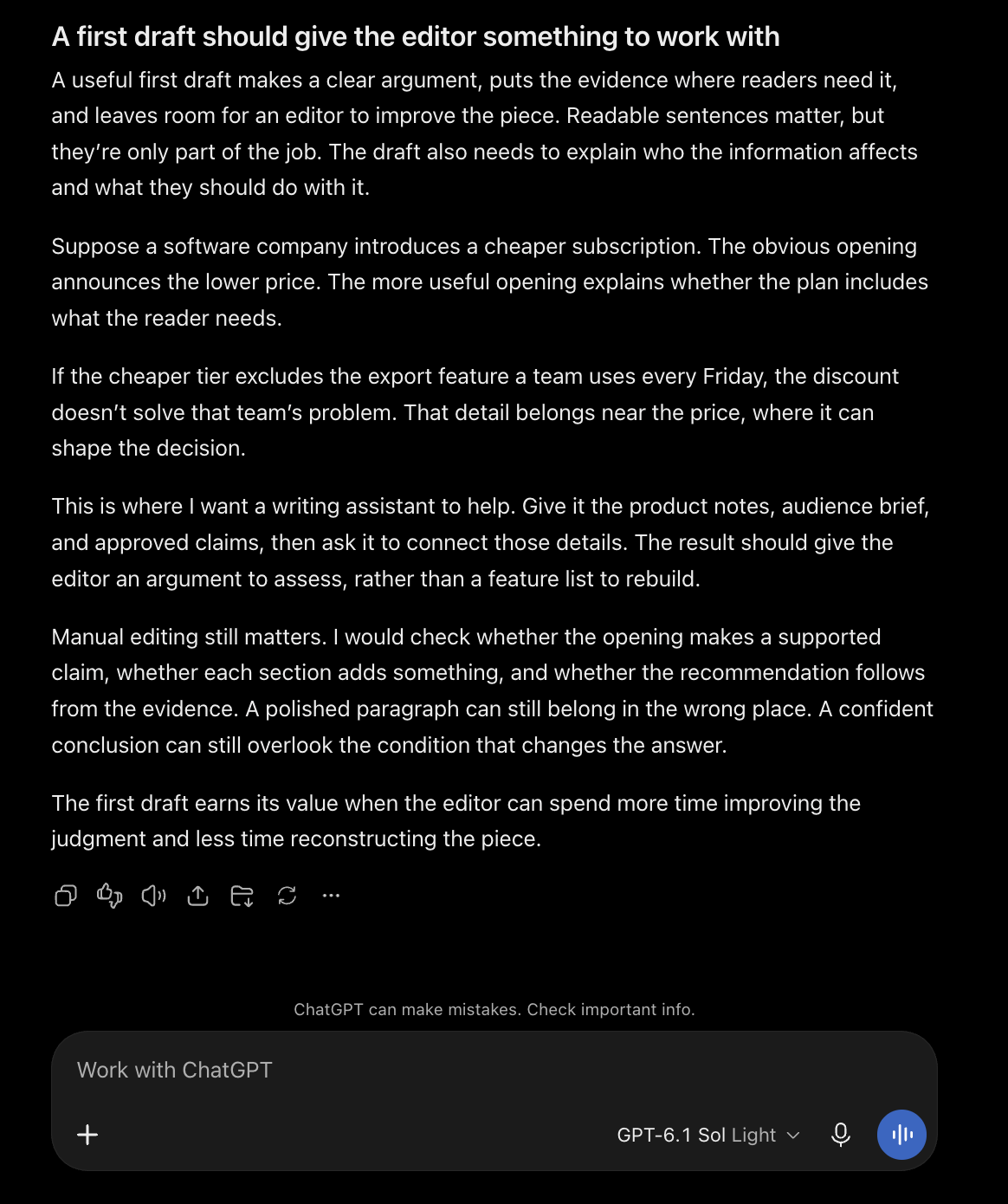
With access to internal documents through connected apps such as Google Drive, ChatGPT can use your briefs, source material, and style rules to develop a first draft. I see it as a strong starting point for someone who understands content and can sharpen the argument through manual editing. Perplexity makes more sense when the immediate need is gathering sources before drafting.
That makes ChatGPT my recommendation for editorial back-and-forth, rather than a proven winner across every writing genre.
Which is better for coding, ChatGPT or Perplexity?
ChatGPT is better suited to changing and maintaining code because Codex provides a dedicated environment for repository work. Perplexity makes sense when the immediate task is finding technical documentation or researching an implementation. Computer can also code and build apps, but documented capabilities alone don’t establish which tool produces more reliable fixes.
OpenAI documents Codex’s repository-based engineering tools, while Perplexity describes Computer’s coding and app-building capabilities.
I separate the choice by task:
| Task | What I’d evaluate | My pick |
|---|---|---|
| Find current library documentation | Correct version and supporting sources | Perplexity |
| Fix a bug in an existing repository | Passing checks and preserved behavior | ChatGPT with Codex |
| Research an implementation approach | Relevant documentation and explained tradeoffs | Perplexity |
| Implement and review a code change | Focused changes and verifiable results | ChatGPT with Codex |
These are recommendations based on product fit. My standard for a coding result stays the same. The fix must run, preserve the required behavior, and leave changes I can review.
Which handles files, images, and voice better?
ChatGPT documents file analysis, image work, and spoken interaction, while Perplexity offers uploads, image generation, and voice features, including Comet. I would compare the exact task on the intended plan and device instead of treating multimodal support as one feature.
| Capability | ChatGPT | Perplexity |
|---|---|---|
| Files | Supports documents, spreadsheets, presentations, and images, subject to plan limits. Audio uploads require a paid subscription or eligible workspace. | Pro includes file and photo uploads and analysis, useful for combining supplied material with web research. |
| Images | Supports image analysis and generation. Reading a chart and creating an illustration are separate tasks. | Pro includes photo analysis and image generation, with plan-dependent access and limits. |
| Voice | Offers several voice experiences. Live doesn’t support video or screen sharing. Supported mobile video features use Advanced. | Comet supports spoken questions and browser navigation, including questions about visible page content. |
Sources: ChatGPT file uploads, ChatGPT Voice, Perplexity Pro features, and Comet voice features.
I’d choose around the recurring assignment. Analyzing a spreadsheet, interpreting a screenshot, and navigating a website by voice need different capabilities. Support for one doesn’t establish how well either tool handles the others.
How do ChatGPT Work and Perplexity Computer compare?
ChatGPT Work and Perplexity Computer both extend the comparison from answering questions to completing assignments. Each can combine research, tools, and deliverables. I wouldn’t choose between them based on an agent label. I would compare access to the required apps, the work produced, the review points, and the usage needed to finish a representative assignment.
ChatGPT Work
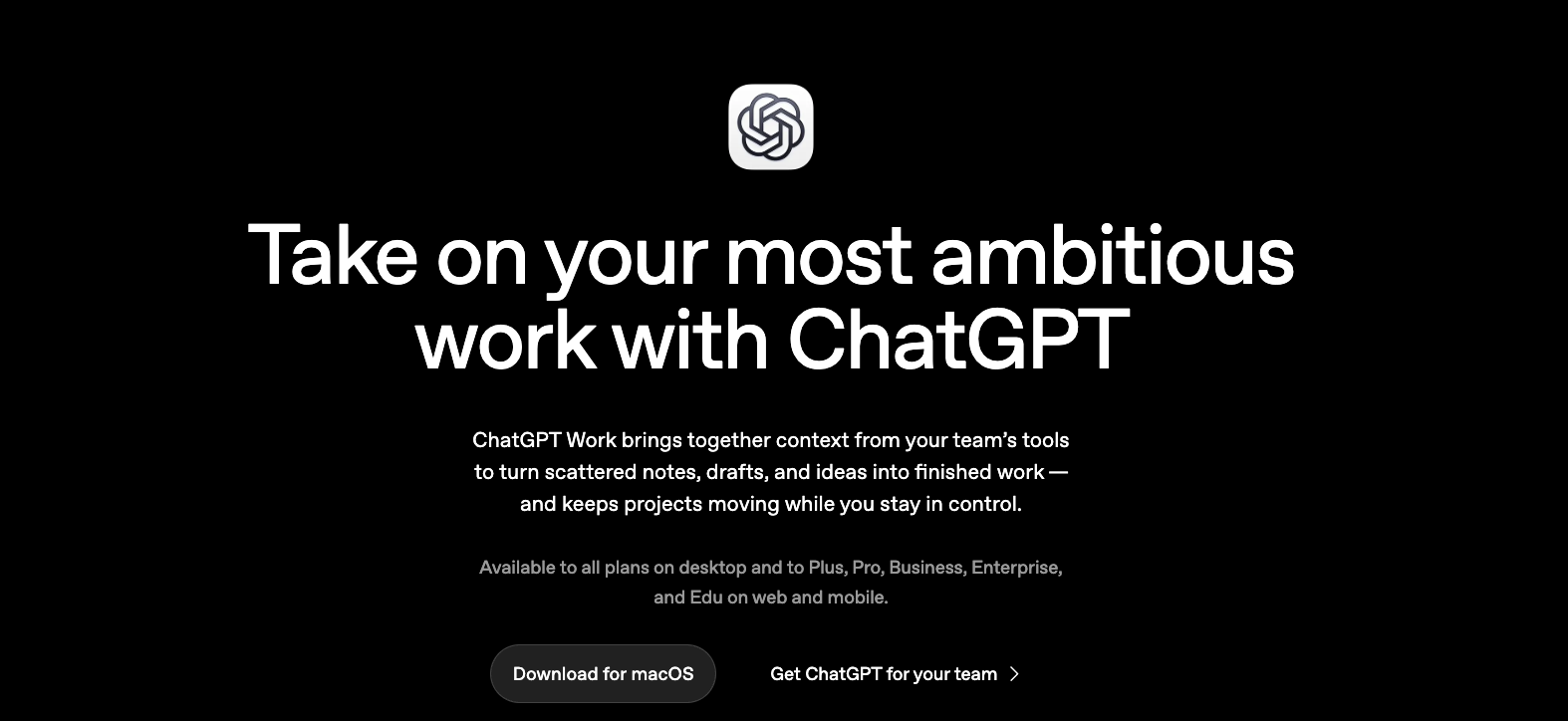
ChatGPT Work uses apps, files, tools, and approved context to create deliverables such as documents, presentations, and spreadsheets. Its product page lists desktop availability across plans, with web and mobile access on Plus, Pro, Business, Enterprise, and Edu. Usage still varies by subscription.
I find this relevant when a question is only the beginning. Suppose I need a meeting brief from supplied notes, a supporting spreadsheet, and a presentation. Keeping those related outputs within one assignment could reduce the effort of carrying context between separate conversations.
But I would judge the files themselves. Does the spreadsheet calculate correctly? Does the presentation preserve the report’s qualifications? Can I make the needed changes in the destination app? An assistant finishing its response isn’t sufficient evidence that my assignment is finished.
Perplexity Computer
Perplexity Computer combines background work, research, browsing, and creation. Its help documentation describes authenticated connections to services such as Gmail, GitHub, Slack, and Notion. Those connections are relevant only when they support the particular action and permissions the assignment requires.
I see a strong case for Computer when research needs to become an ongoing deliverable. An illustrative assignment might ask it to follow a defined set of product announcements and maintain a sourced briefing. I would specify what counts as a meaningful change and where human review belongs.
The practical buying question includes usage. Perplexity’s credit guide distinguishes ordinary Ask searches from Computer work. Paid consumer Pro has weekly Computer usage rolling out. Max includes a monthly credit allocation.
Bonuses are separate and temporary, so I wouldn’t use a sign-up balance to estimate normal monthly capacity. Where included weekly Pro usage is available, Computer is restricted to Light effort without credits.
What happened to Atlas, and how does Comet compare now?
Atlas has retired, so it shouldn’t appear as a current browser alternative to Comet. OpenAI now directs former Atlas users toward supported ChatGPT experiences. Comet remains Perplexity’s browser. For a new purchase, I would compare Comet with the current ChatGPT browser capabilities available to my account rather than reproduce an outdated Atlas head-to-head.
OpenAI’s Atlas retirement guidance confirms that Atlas no longer receives updates. That changes the brief materially. I wouldn’t recommend installing a retired browser because an older comparison still names it.
Comet is listed for Mac, Windows, iOS, and Android. Its browser experience brings Perplexity alongside browsing and page-based tasks. That appeals to me when comparing information across tabs is a regular part of the assignment.
The boundary I care about is between reading a page and acting through it. Summarizing a product page is different from submitting an order or changing an account setting. I want the assistant to make that difference visible and give me an appropriate chance to review consequential actions.
Browser convenience and subscription entitlement also need separate consideration. Installing a browser doesn’t establish unlimited access to every agent feature. In Comet, the distinction between Search and Work mode can affect Computer usage. In ChatGPT, plan and workspace conditions determine which capabilities are available.
How can you compare both tools with the same prompts?
Use identical inputs, comparable plans, and the same success criteria in fresh conversations. Record the mode, date, sources, corrections, and final output. For news, run both close together. For code, execute the checks. The prompts below are a comparison kit, not results from a test conducted for this article, and they don’t establish winners in advance.
Here are five assignments that expose different strengths:
- Breaking news: Ask, “Explain one product announcement from the past 24 hours. Link the original announcement, separate the announcement date from availability, and list what remains unknown.” Score factual freshness and source support. Run both close together so a later publication doesn’t give one tool an unfair advantage.
- Sourced research: Ask, “Compare these three vendors for a ten-person team using official sources. Separate monthly billing from annual commitments, show the must-have features, and flag unanswered questions.” Score plan accuracy and useful omissions. A blank marked unknown should beat a fabricated price or an invented feature restriction.
- Creative writing: Give both the same notes and ask for a 500-word article with a defined audience, argument, and prohibited claims. Then request one constrained revision. Judge whether the revised draft preserves facts and improves the intended point. Fluency alone wouldn’t win if the assistant quietly changes the meaning.
- Reasoning: Supply two fictional vendor quotes, expected team growth, and a twelve-month horizon. Ask for the total cost, assumptions, and the point at which the recommendation changes. Verify the arithmetic separately. I want the explanation to show which input drives the decision, rather than bury the uncertainty behind a confident recommendation.
- Coding: Provide the same small project and a reproducible bug, with requirements defined before either tool begins. Ask for the smallest suitable fix and an explanation of the validation. Compare passing behavior, unintended changes, and review effort. A runnable patch deserves more credit than a longer explanation of an untested solution.
If you want a scorecard, name a winner or tie for each completed assignment and keep the evidence. Don’t combine a free chat answer from one product with a premium agent run from the other and call the result a fair tool-wide ranking.
How much does ChatGPT cost?
ChatGPT offers a Free plan, Go at $8 per month, Plus at $20 per month, and Pro tiers at $100, $200, and $500 per month in the US. Business uses per-seat pricing, while Enterprise requires a quote. Go, Plus, and Pro are billed monthly, with no annual subscription option.
Here’s how the plans differ:
- Free: It includes everyday chat, with limited access to uploads, image creation, voice, deep research, and Codex. It also provides limited access to ChatGPT Work on desktop. It’s a starting point for occasional use, though separate tool limits can interrupt a larger assignment.
- Go: Costs $8 per month and expands access to tools, uploads, image creation, and memory compared with Free. It suits users who need more everyday capacity without moving to Plus. Some advanced capabilities require a higher plan, and Go may include ads in eligible regions.
- Plus: Costs $20 per month and adds advanced reasoning, expanded deep research, higher usage limits, and broader access to ChatGPT Work. It also includes expanded Codex usage. For writing, analysis, and recurring research, Plus is the first paid tier worth comparing directly with Perplexity Pro.
- Pro: Offers three monthly tiers. Pro 100 costs $100, Pro 200 costs $200, and Pro 500 costs $500. Higher tiers provide larger included allowances, while Pro 500 adds Ultrafast for GPT-6 Astra and GPT-6.1 Sol in Work and Codex. Pro 200 is open to new subscribers again, and all Pro 200 subscribers now receive the same Work and Codex allowance. Model limits still apply, and Chat, Work, and Codex can have separate usage conditions. OpenAI Help Center
- Business: Standard seats cost $25 per user per month or $20 per user per month billed annually. Premium seats cost $125 monthly or $100 per month billed annually. Business requires at least two seats and adds a managed workspace, centralized billing, administration, and no training on business data by default.
- Enterprise: Uses custom pricing. It adds enterprise controls, configurable retention, expanded context, and support options for larger deployments. The quote depends on the organization’s requirements. Compare the proposed allowances and contract terms rather than treating Enterprise as a fixed-price upgrade from an individual Pro subscription.
See the ChatGPT pricing page for the full breakdown.
How much does Perplexity cost?
Perplexity offers Free, Pro at $20 per month or $200 per year, and Max at $200 per month or $2,000 per year. Its pricing page displays rounded annual equivalents of $17 and $167 per month. Enterprise plans charge per seat, while Education Pro offers discounted access for verified eligible users.
Here’s how the plans differ:
- Free: Provides basic search with citations for limited use. It suits straightforward questions and occasional source discovery. Advanced model selection and broader research capabilities sit behind paid plans, so Free access shouldn’t be treated as equivalent to the Pro or Max experience.
- Pro: Costs $20 monthly or $200 annually. It adds advanced model selection, deeper research, more uploads, and document and app creation. Weekly Computer usage is rolling out to paid Pro accounts. The advertised 4,000-credit bonus is separate from recurring usage and shouldn’t be counted as a monthly allowance.
- Max: Costs $200 monthly or $2,000 annually, with annual purchasing available through the web app. It expands access to advanced models and research capabilities and includes 10,000 monthly Computer credits. The advertised 35,000 bonus credits are temporary, rather than an additional recurring monthly allocation.
- Enterprise Pro: Costs $40 per seat monthly or $400 annually, according to the Enterprise billing guide. It adds organization controls and includes 500 monthly Computer credits per seat. Perplexity displays this annual rate as about $34 per seat per month.
- Enterprise Max: Costs $325 per seat monthly or $3,250 annually. It includes 15,000 monthly Computer credits per seat, higher usage limits, and additional enterprise capabilities. The displayed $271 monthly figure applies to annual billing. Compare the annual commitment and included capacity before choosing it over Enterprise Pro. Perplexity Help Center
- Education Pro: Costs $10 per month for verified students and educators. Perplexity does not list an annual billing option for this tier. It includes advanced model selection, deep research, expanded uploads, and Computer access.
Check Perplexity’s pricing page for current offers and billing conditions.
Perplexity vs ChatGPT: which should you choose?
Choose Perplexity if source discovery and current research dominate your day, and choose ChatGPT if you need a broader environment for writing, coding, and turning material into finished work. I would pay for both only when each handles a distinct recurring task. Otherwise, I would keep one paid subscription and use the other’s free access when appropriate.
When I recommend Perplexity
I recommend Perplexity for a reader who starts with questions such as “What changed?” and “Where did that claim come from?” Its search-centered design and model options are a good fit for building a source trail before deciding.
I would choose Pro before Max unless a specific model, allowance, or Computer workload justified the higher tier. For fact-checking, my recommendation includes opening the original evidence. I’m recommending a research aid, not delegating the final judgment about truth.
When I recommend ChatGPT
I recommend ChatGPT when the assignment continues through drafting, revision, analysis, or repository work. The combination of ChatGPT, Work, and Codex gives me a stronger product-fit argument for that broader routine. I would start with Plus when its documented capabilities cover the task.
When I would use both
I see a case for both when source discovery and production are separate, substantial parts of the week. I don’t see a case for paying twice merely to ask the same casual question in two places. My keyword research workflow is a good example.
Once I have data from Google Keyword Planner, I prefer ChatGPT to group related queries and think through search intent. I reach for Perplexity when I need sources I can open and check. I explain how I choose primary and secondary keywords in my keyword research guide.
Sometimes I switch to Claude once the keyword research is ready. I give it the keywords and search intent, then use it to turn the research into a content brief.
Before subscribing, give both tools one real assignment with a defined finish line. Keep the sources, corrections, and final output.
Choose the subscription that removes the work you repeat, rather than the one that produces the most impressive opening answer.
Frequently asked questions
What are the disadvantages of Perplexity?
The disadvantages of Perplexity include plan-dependent model access, Computer usage conditions, and the need to verify cited claims. Using an OpenAI model doesn’t include the full ChatGPT product. I would also review consumer training settings before sharing work material. These are practical constraints to weigh against its source-centered research experience, rather than reasons to dismiss it.
Does Perplexity AI track you?
Yes. Perplexity collects device and interaction data, including information used to operate and personalize the service. Its help guidance says consumer AI Data Retention is enabled by default and provides an opt-out for future training collection. Turning that setting off doesn’t stop all operational processing. I would review browser and connector permissions separately before adding private work context.
What is the controversy around Perplexity?
Perplexity has faced disputes over publisher content, attribution, and crawling. The Dow Jones and New York Post complaint alleges copyright and trademark violations. Those allegations aren’t findings of liability. Perplexity’s crawler guidance says it respects robots.txt and describes changes intended to prevent misuse. I keep those positions distinct from judging a particular answer’s accuracy.
Is Perplexity more accurate than ChatGPT?
Perplexity is better suited to finding current facts and source-backed answers, while ChatGPT suits writing, coding, and analysis. Accuracy depends on the task, model, and sources, so neither is consistently more accurate across every use case. Check that each citation supports the specific claim before relying on either tool’s answer.
Can Perplexity replace a ChatGPT subscription?
Perplexity can replace ChatGPT when the main requirement is research and the needed capabilities are included in the chosen plan. It doesn’t provide the complete ChatGPT product just because it offers some OpenAI models. I would keep ChatGPT when its own tools or project environment are central, and switch only when Perplexity covers the recurring assignment.